Zia
Designing a Digital Privacy Coach for Gen Z
Timeline:
Role:
UX Designer & Reseacher
6 weeks
Platform:
Mobile (concept)
Methods:
User interviews, synthesis, personas, interaction design, prototyping, usability testing
Helping Gen Z understand and take control of their digital privacy–without fear, jargon, or friction.
Zia is a concept mobile experience designed to help Gen Z users learn about digital privacy, recognize risky behaviors, and take meaningful action in ways that feel clear, supportive, and culturally fluent.
Executive Summary
Gen Z users care about digital privacy, but most rely on default settings and only take action when something feels invasive. Existing privacy tools are often complex, buried in menus, and written in technical language that discourages engagement.
Through qualitative research and usability testing, we designed Zia, a digital privacy coach that teaches privacy concepts through quizzes, provides feedback users can understand, and reinforces progress through lightweight gamification. This case study demonstrates how research insights translated into concrete design decisions, iterations, and a final prototype focused on clarity, trust, and empowerment.
Why Digital Privacy Is Broken for Gen Z
Digital privacy tools often assume users are either highly motivated or technically informed. Gen Z users are neither apathetic nor ignorant, but they are overwhelmed.
Feeling watched by ads and tracking
Recognizing privacy terms without understanding them
Trusting defaults settings because alternatives feel confusing
Acting only when discomfort crosses a personal line
The core problem is not awareness, it's translation. Privacy systems fail to translate abstract risk into understandable, actionable moments.
Research Goals & Approach
Research Goals:
I conducted 30-minute remote interviews with 5 Gen Z participants (ages 22-26) who actively use TikTok, Discord, YouTube, and Instagram. Privacy attitudes are emotional and contextual; surveys would flatten these nuances, so I chose qualitative interviews to capture discomfort, resignation, and trust signals.
Methods:
I set out to understand:
How Gen Z feels about digital privacy in daily life
What prevents proactive privacy behavior
What would make privacy tools feel helpful instead of punitive
Why Interviews:
Privacy attitudes are emotional and contextual. Interviews allowed me to capture discomfort, resignation, and trust signals that surveys often flatten.
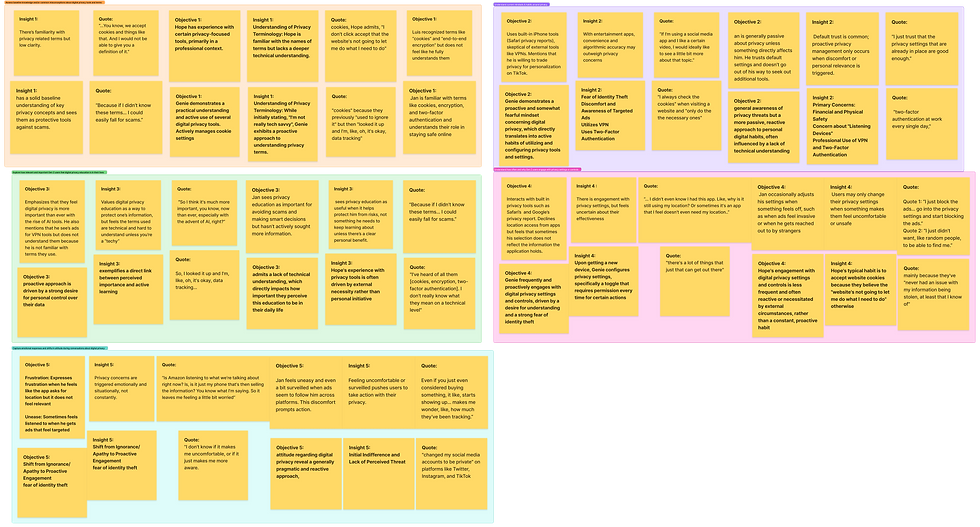
Research Insights
1.
Awareness ≠ Understanding
Participants recognized terms like cookies, tracking, and VPNs, but struggled to explain what they meant or how they affect them.
"I've heard of all them...I probably interact with them, but I don't really know what they mean."
2.
Discomfort Drives Action
Privacy concern is reactive. Users act after something feels invasive or "creepy."
"If we were to talk about a certain product now...I'd probably see that exact product up on Amazon."
3.
Defaults Are Trusted by Necessity
Users rely on default privacy settings not because they trust them–but because alternatives feel time consuming or unclear.
"I just trust that the privacy settings that are already in place are good enough."
Personas

The Privacy Aware Skeptic
Devin is a community college student who spends most of his time on Discord, Reddit, and YouTube across his gaming setup. Devin will engage deeply if a tool respects his intelligence and time.

The Cautious Creator
Jasmine is a high school student who creates content on TikTok, Instagram, and YouTube using her iPhone. Jasmine follows social proof. If her peers talk about a tool or it feels culturally relevant she’s more likely to trust it.
Defining the Opportunity
Expectations vs. Reality
Participants recognized terms like cookies, tracking, and VPNs, but struggled to explain what they meant or how they affect them.
Assumption
Reality
They understand privacy terminology
Gen Z doesn't care about privacy
Recognition
They care when it feels personal
Concerns lead to actions
Action follows discomfort
Opportunity:
Design a privacy experience that connects abstract risk to everyday behaviors–and shows users their actions actually matter.
Design Principles
These principles will guide every design decision:
1.
Teach Without Lecturing
Use quizzes, examples, and friendly language instead of dense explanations
2.
Make Privacy Feel Personal
Anchor learning in real triggers like ads, links, and app behavior.
3.
Reward Progress, Not Perfection
Encourage small wins rather than total mastery.
4.
Show Proof to Build Trust
Confirm actions clearly so users know something changed
Concept Overview: What is Zia?
Zia is a digital privacy coach that helps Gen Z users:
Learn privacy concepts through interactive quizzes
Identify risky links or behaviors
Take guided actions with visible outcomes

Rather than acting as a control panel, Zia acts as a translator, turning complex systems into understandable moments.
Core Features
Privacy Quizzes
BuzzFeed style quizzes reveal users' privacy habits while teaching concepts through examples–not definitions.
Why it works:
Familiar formats lower cognitive load and increase engagement.
Shield Check
A quick scan that flags sketchy links or behaviors and explains why they're risky.
Why it works:
Connects privacy risk to real, immediate context.
Guided Actions
Step-by-step recommendations with clear confirmation of what changed.
Why it works:
Builds trust by showing cause and effect
XP & Gamification
XP, badges, and progress indicators reinforce learning without pressure.
Why it works:
Motivates continued engagement without fear tactics.
Wireframes -> High–Fidelity Design
Early wireframes focused on:
Minimal cognitive load
Conversational guidance
Clear hierarchy
As designs evolved, I refined:
Visual feedback for actions
Clearer progress indicators
Stronger differentiation between quiz type
Usability Testing Plan
Method
I conducted 4 moderated usability tests (25-30 minutes each) using a Figma prototype. Task-based flows mapped to both personas to evaluate first-time clarity, educational effectiveness, and trust signals.
Purpose
To evaluate:
First-time clarity
Educational effectiveness
Engagement with quizzes and XP
Trust and perceived protection
Findings & Iterations
Finding 1: Users Wanted Faster Context
Participants expected notifications to lead directly to the issue–not a general dashboard.
Iteration:
“I was expecting to just kind of be brought directly to a quiz… Now it seems like I’m back at a dashboard.”
Finding 2: Quizzes Needed Better Feedback
Users enjoy quizzes but wanted explanations for wrong answers.
Iteration:
Added contextual feedback and examples.
Finding 3: Quiz Types Felt Repetitive
Lightning rounds felt too similar to standard quizzes.
Iteration:
Differentiated quizzes by intent: learning vs. reinforcement.
Finding 4: Users Wanted Proof of Action
Participants didn't trust that actions were actually completed.
Iteration:
Added confirmation states showing what changed and why it matters.
Finding 5: XP Lacked Meaning
Users liked earning XP but didn't know what it was for.
Iteration:
Introduced clearer progress indicators tied to outcomes.


Before

After


“There wasn’t really an explanation—just a check mark.”
“The lightning round has some of the same questions… but I get why they’re repeated—to drill it into your brain a little more.”

“I just get another chat saying that it was done. I guess I don’t know for sure if it was actually done or not.”
“I just get another chat saying that it was done. I guess I don’t know for sure if it was actually done or not.”
Before

After

Before

After

Final Prototype Snapshot
The final prototype presents:
Clear entry point for learning
Actionable guidance for learning
Visible confirmation of progress and protection
Zia feels supportive, not judgmental, and positions privacy as something users can understand and manage.
Outcomes & What This Demonstrates
This project demonstrates my ability to:
Translate qualitative research into design direction
Design for trust and comprehension
Iterate based o usability evidence
Balance education, engagement, and clarity
What I'd Do Next Steps
With more time, I would:
Test with younger Gen Z users (ages 13-18) to validate design for earlier digital behaviors
Measure long-term behavior change to validate whether learning translates to sustained privacy actions
Explore browser or OS-level integrations to reduce friction and increase contextual relevance